

How to Spot AI-Generated Video in 2026: 9 Signs to Check
July 13, 2026
Also in: Українська · Français
Two years ago, spotting an AI-generated video was easy: six fingers, melting faces, text that turned into alien script. Today, models like OpenAI Sora, Google Veo and Kling produce clips that routinely fool millions of viewers — and the "obvious" tells are mostly gone.
The good news: AI video still leaves traces. Some of them you can catch with your own eyes. Others need software. This guide covers both.
What your eyes can still catch
1. Physics that is almost right
AI models learn what motion looks like, not how physics works. Watch for liquids that pour slightly wrong, hair and clothing that move a beat too late, smoke that curls unnaturally, and objects that gently drift instead of falling. The mistakes are subtle now — it is rarely "wrong", more often "dreamlike".
2. Hands and object interaction
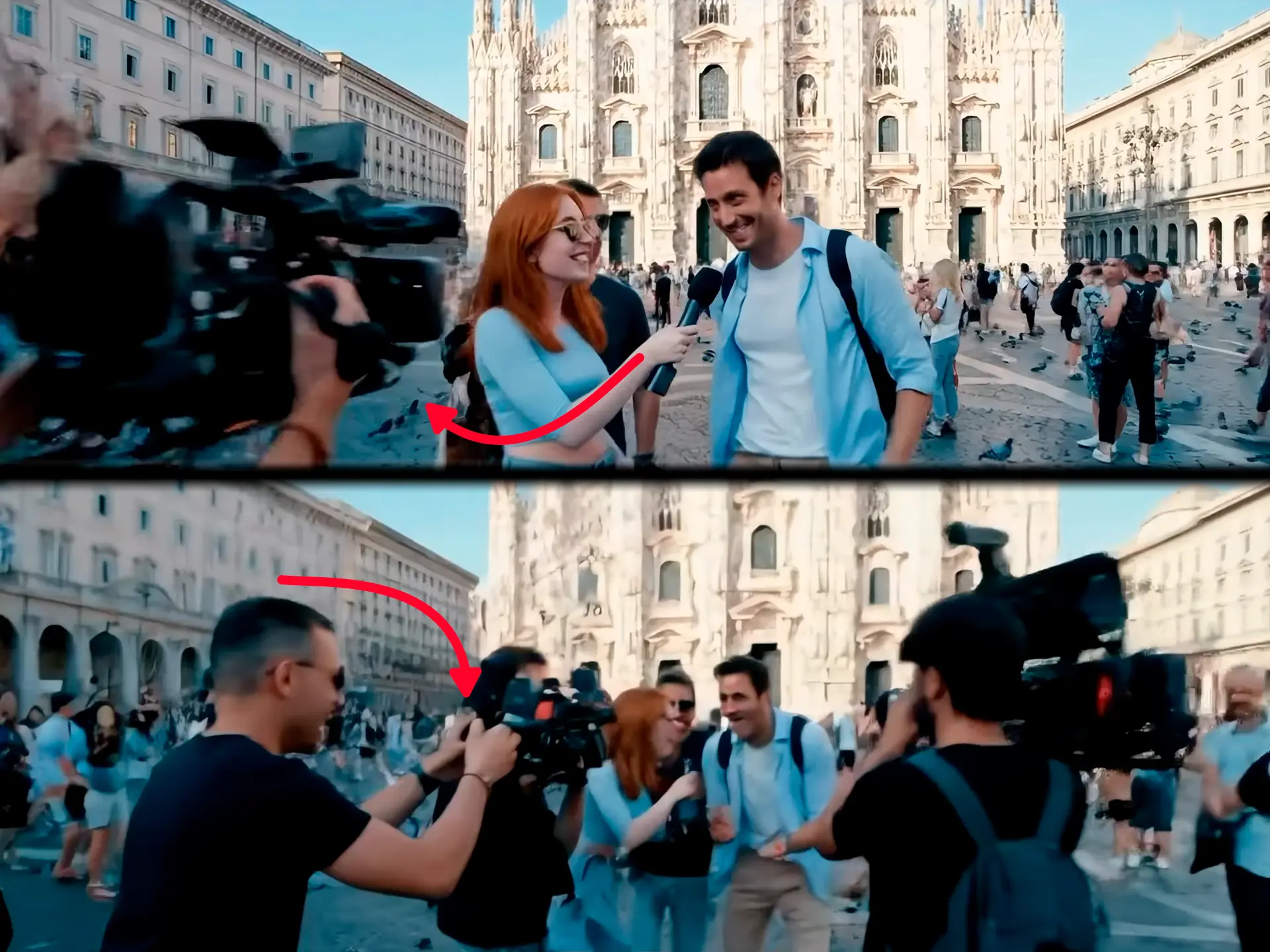
Hands themselves have improved dramatically. What still breaks is interaction: fingers that grip a cup but do not quite touch it, a pen that floats a millimetre above the paper, items that merge into palms during fast motion. Pause the video on any moment where a hand meets an object.
3. Background people and text
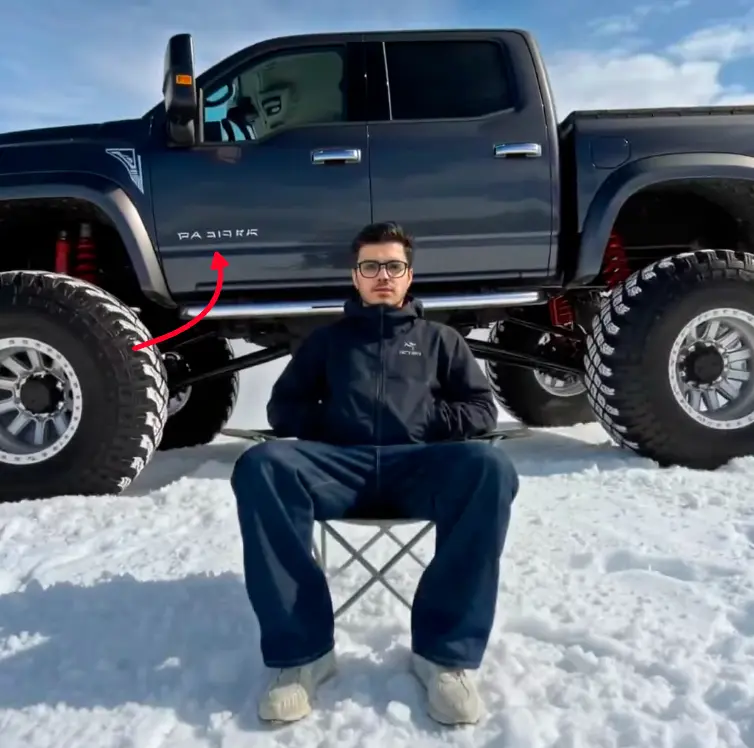
Models spend their "attention" on the main subject. The background is where they cut corners: pedestrians who walk in place, faces in a crowd that look copy-pasted, signage and labels that dissolve into pseudo-letters when you zoom in. Street signs, price tags and t-shirt prints are the classic weak points.
4. Texture consistency between frames
Scrub the video frame by frame around a fast movement. AI generators often "repaint" fine textures — skin pores, fabric weave, foliage — slightly differently in each frame, which creates a faint shimmering or boiling effect that real cameras never produce. The Veo 3 frames in point 2 show an extreme case: it is not just texture that gets repainted between scenes, but the whole camera.
5. Too-perfect camera work
Real handheld footage has micro-jitter, focus hunting, exposure adjustments. Many AI clips have an eerily smooth, weightless camera glide — like a drone that ignores gravity. Ironically, newer models now imitate shaky UGC-style footage, so treat this as one signal, never proof.
6. Lighting that does not add up
Check shadows: do all of them point the same way? Do reflections in windows, water and eyes match the scene? AI often nails the overall mood but fumbles the geometry of light — a face lit from the left in a room where every lamp is on the right.
7. Loops and duration
Many generators still produce clips in short segments. A "long" AI video is often several 5–10 second shots stitched together, with subtle scene resets at the cuts: clothing details change, background cars teleport, the coffee cup refills itself.
8. Audio that is glued on
Lips that almost sync, room echo that does not match the room, ambient sound that stays identical when the scene changes. If the voice feels like it was recorded in a studio while the video shows a windy street — be suspicious.
9. The source itself
The fastest check has nothing to do with pixels. Who posted it? Is it a fresh account? Does a reverse search find the same clip earlier, elsewhere, with different claims? Extraordinary footage from an account created last week is a red flag older than AI.
When half the list does not apply
Read the nine signs again and sort them by what they need. Hands need a hand. Background text needs a sign. Lip sync needs a face. Objects that fall wrong need objects.
Now look at the clip above. Fog, trees, nobody. Half the list has nothing to attach itself to, and clips like it are not rare: landscapes, weather, water and drone shots are a large share of the generated video people share. Our own detector read this one as real footage.
Inside the picture you are left with the slow half of the list, points 4, 5 and 6, and all three want a pause and a second viewing.
Outside the picture you are left with more. On footage like this, point 9 stops being the fastest check and becomes the main one. A forest clip from an account that has been posting that forest for eight years is probably a forest. The same clip from an account opened last week, captioned as somewhere in this morning's news, is a different proposition, and you can settle that without looking at a single pixel.
When your eyes are not enough
Here is the uncomfortable truth: the best AI clips now pass all nine checks for a casual viewer. Detection is becoming a statistics problem, not an eyesight problem.
That is what detector models are for. Our own detector at AI Video Check analyses the deep visual features of every frame — patterns in texture, motion and structure that generators leave behind but human eyes cannot register — and compares them against thousands of real and AI-generated clips, from Sora and Veo to Kling, Runway and Wan. It returns a probability score and, in most cases, a guess at which generator made the clip. A one-minute video takes about 10–30 seconds to check, and you can start without an account.
No detector — ours included — is a court of law. Treat any score as strong evidence, combine it with source verification, and stay skeptical of anything extraordinary.
Quick checklist
- Pause on hands touching objects
- Zoom into background text and faces
- Scrub frame-by-frame around fast motion
- Check shadow directions and reflections
- Look for scene resets every 5–10 seconds
- Listen for audio that does not match the room
- Check who posted it and when
- Run it through a detector for the verdict your eyes cannot give
Real videos are innocent until proven guilty. AI videos are getting better every month. The habit that protects you is not paranoia — it is a 30-second verification routine before you share.
Not sure if a video is real?
Check it free →